楚天

惟楚有材,于斯为盛

redis 数据结构与对象

time:2026_2_27

SDS 动态字符串

SDS 和 c 中的string 并不相同

1
2
3
4
5
6
struct sdshdr{
int len;
int free;
char buf[]
}

内存分配

  1. 少于1MB 的时候发生扩容的时候,len 和free 长度相同,分配内存为 len+free+1
  2. 大于1MB len 为当前大小,free 固定为1MB 内存为 len(buf size)+ free(1MB)+1bt

其它特性

  1. SDS具有二进制安全,在记录字符串的时候,能够记录任意位置空格(string 所不具有的),并且通过约定在末尾加入空格的方式能够实现兼容string 实现string的相加等功能
  2. key 为SDS

链表

1
2
3
4
5
6
7
8
9
10
11
12
13
14
15
16
typedef struct listNode{
struct ListNode * prev;
struct ListNode * next;
void * value;
} listNode;

typedef struct list{
listNode *head;// 头
listNode *tail;//尾
unsigned long long ; // 长度

void *(*dup)(void * ptr);//复制
void *(*free)(void *free);// 释放
void *(* match)(void *match);//匹配
} list;

字典

1
2
3
4
5
6
7
8
9
10
11
12
13
14
15
16
17
18
typedef struct dictht{
dictEntry ** table;
unsigned long size;
unsigned long sizemask;

unsigned long used;
}dictht;

typedef struct dictEntry{
void *key;
union{
void *val;
uint64_tu64;
int64_ts64;
} v;
struct dictEntry *next; // 指向下一个行成表 可以解决相同键值保存的问题
}

![alt text](/img/notes/学习/redis设计与实现/image/截屏2026-02-27 16.38.23.png)

1
2
3
4
5
6
7
8
typedef struct dict{
dicType * type;
void *provdata;
dictht ht[2];

int trehashids;
}

数据扩容操作实现

队列

跳跃队列

元素

内网穿透方案_ZeroTier

Liunx 配置

  1. 安装
1
curl -s https://install.zerotier.com | sudo bash
  1. 启动并设为开机自启
1
2
sudo systemctl enable --now zerotier-one
sudo systemctl status zerotier-one --no-pager

) 加入网络(Network ID)

1
sudo zerotier-cli join <NETWORK_ID>
  1. 去 Central 授权

  2. 验证是否拿到 Managed IP

1
2
3
sudo zerotier-cli status
sudo zerotier-cli listnetworks
ip a | grep -n "zt"

Windows(Win10/Win11)

  1. 安装
  1. 去 ZeroTier 官网下载 Windows Installer(.msi / .exe)
  2. 双击安装(默认一路 Next 即可)
  1. 启动方式
  • 安装后通常会自动启动服务,并在右下角托盘出现 ZeroTier 图标
  • 若没看到托盘图标:开始菜单打开 ZeroTier One(会拉起托盘)
  • 或检查服务:Win + Rservices.msc → 找到 ZeroTier One(或类似名字)→ 启动
  1. 加入网络(GUI)
  1. 右下角托盘 ZeroTier 图标右键
  2. Join New Network…
  3. 粘贴 <NETWORK_ID> → Join

最小联通测试

在任意一端用对方 Managed IP:

  • 测试连通:
1
ping <对方Managed_IP>
  • SSH(Linux 目标):
1
ssh user@<对方Managed_IP>
  • RDP(Windows 目标,默认 3389):
    mstsc /v:<对方Managed_IP>

CUDA 开启的 GPU 编程

time:2025_12_26


1. 工程与编译(CMake / nvcc)

1.1 最小 CMake 工程

1
2
3
4
5
6
7
8
9
10
11
12
13
14
15
16
17
18
cmake_minimum_required(VERSION 3.18)
project(hellocuda LANGUAGES CXX CUDA)

add_executable(main main.cu)

set_target_properties(main PROPERTIES
CUDA_STANDARD 17
CUDA_STANDARD_REQUIRED ON
)

# 需要跨 .cu 调用 device 函数/做 device link 时开启
set_target_properties(main PROPERTIES CUDA_SEPARABLE_COMPILATION ON)

# 常用 CUDA 编译选项(按需启用)
target_compile_options(main PUBLIC
$<$<COMPILE_LANGUAGE:CUDA>:--expt-relaxed-constexpr>
$<$<COMPILE_LANGUAGE:CUDA>:--expt-extended-lambda>
)

1.2 推荐的基础错误检查宏

避免依赖 sample 的 helper_cuda.h,直接自带一个最小版:

1
2
3
4
5
6
7
8
9
10
11
12
#include <cstdio>
#include <cstdlib>
#include <cuda_runtime.h>

#define CUDA_CHECK(call) do { \
cudaError_t err = (call); \
if (err != cudaSuccess) { \
std::fprintf(stderr, "CUDA error %s:%d: %s\n", \
__FILE__, __LINE__, cudaGetErrorString(err)); \
std::exit(1); \
} \
} while(0)

2. CUDA 基础:函数修饰符与执行位置

2.1 __global__ / __device__ / __host__

  • __global__:核函数(kernel)

    • 在 GPU 上并行执行
    • 由主机端(CPU)发起 <<<...>>>
    • 返回类型必须为 void(通常通过指针写回结果)
  • __device__:设备函数

    • 在 GPU 上执行
    • 只能从 device/global 调用
  • __host__:主机函数

    • 在 CPU 上执行
    • 未标注的普通函数默认就是 host

组合:

  • __host__ __device__:同一函数在 CPU/GPU 两侧都可用(注意 device 侧不支持完整的 C++ 标准库能力)

2.2 __CUDA_ARCH__(区分 device/host 编译路径)

  • __CUDA_ARCH__ 只在 device 编译路径中定义,值为计算能力架构号(例如 750/800 等)
  • 常用于同一个函数在 host/device 的条件编译
1
2
3
4
5
6
7
__host__ __device__ inline int where_am_i() {
#ifdef __CUDA_ARCH__
return __CUDA_ARCH__; // device:架构号
#else
return -1; // host:标记
#endif
}

2.3 constexpr 与 device 代码

  • 如需更宽松的 constexpr 在 device 侧工作,常用 --expt-relaxed-constexpr
  • device 侧 lambda 扩展常用 --expt-extended-lambda

3. Kernel 启动、线程块模型与索引

3.1 Kernel 启动语法

1
kernel<<<grid, block, shared_bytes, stream>>>(args...);
  • 常用:<<<grid, block>>>
  • shared_bytes:动态共享内存字节数(默认 0)
  • stream:CUDA 流(默认 0)

3.2 线程/块索引

  • threadIdx.{x,y,z}:线程在块内索引
  • blockIdx.{x,y,z}:块在网格内索引
  • blockDim.{x,y,z}:每块线程数维度
  • gridDim.{x,y,z}:网格块数维度

3.3 典型打印示例(便于理解执行模型)

1
2
3
4
5
6
7
8
9
10
11
12
13
14
#include <cstdio>
#include <cuda_runtime.h>

__global__ void kernel() {
printf("block %d/%d, thread %d/%d\n",
blockIdx.x, gridDim.x,
threadIdx.x, blockDim.x);
}

int main() {
kernel<<<2, 3>>>();
cudaDeviceSynchronize();
return 0;
}

3.4 Grid-Stride Loop(通用遍历范式)

适用于任意大小数据与任意 grid/block 配置:

1
2
3
4
5
6
7
__global__ void work(int* a, int n) {
for (int i = blockIdx.x * blockDim.x + threadIdx.x;
i < n;
i += blockDim.x * gridDim.x) {
a[i] = i;
}
}

4. 同步与错误处理

4.1 CPU/GPU 默认异步

  • kernel launch 对 host 来说通常是异步的

  • 常用同步:

    • cudaDeviceSynchronize():等待当前设备上所有已提交工作完成
    • cudaStreamSynchronize(stream):等待某个流完成

4.2 推荐的 launch 后检查模板

1
2
3
kernel<<<grid, block>>>(...);
CUDA_CHECK(cudaGetLastError());
CUDA_CHECK(cudaDeviceSynchronize());

5. 内存管理(Host/Device/Unified)

5.1 经典模式:cudaMalloc + cudaMemcpy

1
2
3
4
5
6
7
8
9
10
11
12
13
14
15
16
17
18
19
20
21
22
23
24
25
26
27
28
29
#include <cstdio>
#include <cuda_runtime.h>

#define CUDA_CHECK(call) do { \
cudaError_t err = (call); \
if (err != cudaSuccess) { \
std::fprintf(stderr, "CUDA error: %s\n", cudaGetErrorString(err)); \
std::exit(1); \
} \
} while(0)

__global__ void kernel(int* out) { *out = 42; }

int main() {
int* d_out = nullptr;
CUDA_CHECK(cudaMalloc(&d_out, sizeof(int)));

kernel<<<1,1>>>(d_out);
CUDA_CHECK(cudaGetLastError());
CUDA_CHECK(cudaDeviceSynchronize());

int h_out = 0;
CUDA_CHECK(cudaMemcpy(&h_out, d_out, sizeof(int), cudaMemcpyDeviceToHost));

std::printf("ret=%d\n", h_out);

CUDA_CHECK(cudaFree(d_out));
return 0;
}

5.2 统一内存(Unified Memory):cudaMallocManaged

  • 一份指针同时可被 CPU/GPU 访问
  • 常配合同步;性能敏感时可用预取提升稳定性
1
2
3
4
5
6
7
8
9
10
11
12
13
14
15
16
17
18
19
20
21
22
#include <cstdio>
#include <cuda_runtime.h>

__global__ void fill(int* a, int n) {
for (int i = blockIdx.x * blockDim.x + threadIdx.x;
i < n; i += blockDim.x * gridDim.x) {
a[i] = i;
}
}

int main() {
int n = 32;
int* a = nullptr;
cudaMallocManaged(&a, sizeof(int) * n);

fill<<<1, 128>>>(a, n);
cudaDeviceSynchronize();

for (int i = 0; i < n; ++i) std::printf("a[%d]=%d\n", i, a[i]);
cudaFree(a);
return 0;
}

5.3 预取(Prefetch)与驻留优化(进阶但常用)

1
2
3
4
5
6
int dev = 0;
cudaGetDevice(&dev);
cudaMemPrefetchAsync(a, sizeof(int)*n, dev, 0); // 预取到 GPU
// kernel ...
cudaMemPrefetchAsync(a, sizeof(int)*n, cudaCpuDeviceId, 0); // 预取回 CPU
cudaDeviceSynchronize();

6. C++ 封装:RAII 与可复用接口

6.1 RAII 管理 Unified Memory 指针(简单、可靠、适合入门)

1
2
3
4
5
6
7
8
9
10
11
12
13
14
15
16
17
18
19
#include <cuda_runtime.h>
#include <cstddef>

template<class T>
struct ManagedArray {
T* p{nullptr};
size_t n{0};

explicit ManagedArray(size_t n_) : n(n_) {
cudaMallocManaged(&p, sizeof(T) * n);
}
~ManagedArray() {
if (p) cudaFree(p);
}
T* data() { return p; }
const T* data() const { return p; }
T& operator[](size_t i) { return p[i]; }
const T& operator[](size_t i) const { return p[i]; }
};

6.2 结合 kernel 使用

1
2
3
4
5
6
7
8
9
10
11
12
13
14
15
__global__ void init(int* a, int n) {
for (int i = blockIdx.x * blockDim.x + threadIdx.x;
i < n; i += blockDim.x * gridDim.x) {
a[i] = i;
}
}

int main() {
int n = 1000;
ManagedArray<int> a(n);
init<<<32, 128>>>(a.data(), n);
cudaDeviceSynchronize();
// CPU 侧直接读
return 0;
}

allocator 方式也可把 unified memory 接入 std::vector,但 allocator 细节较多;建议先把 RAII 指针与 .data() 传参掌握牢。


7. Thrust 库:容器与算法(高层 CUDA)

7.1 常用容器

  • thrust::host_vector<T>:主机端 vector
  • thrust::device_vector<T>:设备端 vector
  • 通过赋值可触发 H2D / D2H 拷贝(更准确地说:构造/赋值会在 host/device 容器之间进行数据迁移)

7.2 AXPY 示例(device_vector + 自写 kernel)

1
2
3
4
5
6
7
8
9
10
11
12
13
14
15
16
17
18
19
20
21
22
23
24
25
26
27
28
29
30
31
#include <thrust/host_vector.h>
#include <thrust/device_vector.h>
#include <cuda_runtime.h>
#include <cstdio>

__global__ void axpy(float* x, const float* y, float a, int n) {
for (int i = blockIdx.x * blockDim.x + threadIdx.x;
i < n; i += blockDim.x * gridDim.x) {
x[i] = a * x[i] + y[i];
}
}

int main() {
int n = 1 << 20;
float a = 3.14f;

thrust::host_vector<float> hx(n), hy(n);
for (int i = 0; i < n; ++i) { hx[i] = i * 0.001f; hy[i] = 1.0f; }

thrust::device_vector<float> dx = hx;
thrust::device_vector<float> dy = hy;

axpy<<<256, 256>>>(thrust::raw_pointer_cast(dx.data()),
thrust::raw_pointer_cast(dy.data()),
a, n);
cudaDeviceSynchronize();

hx = dx;
std::printf("hx[0]=%f, hx[n-1]=%f\n", hx[0], hx[n-1]);
return 0;
}

8. 原子操作(Atomic)

8.1 常用原子

  • atomicAdd / atomicSub
  • atomicAnd / atomicOr / atomicXor
  • atomicMin / atomicMax
  • atomicCAS:Compare-And-Swap,可用于构造自定义原子操作

8.2 用 CAS 实现自定义原子加

1
2
3
4
5
6
7
8
9
__device__ __forceinline__ int my_atomic_add(int* dst, int val) {
int old = *dst;
int assumed;
do {
assumed = old;
old = atomicCAS(dst, assumed, assumed + val);
} while (assumed != old);
return old;
}

8.3 朴素并行求和(全局原子累加)

1
2
3
4
5
6
__global__ void parallel_sum(int* sum, const int* arr, int n) {
for (int i = blockIdx.x * blockDim.x + threadIdx.x;
i < n; i += blockDim.x * gridDim.x) {
atomicAdd(sum, arr[i]);
}
}

9. 线程块与共享内存(Shared Memory)

9.1 核心概念

  • __shared__:块内共享内存(一个 block 内所有线程可见)
  • __syncthreads():块内同步屏障(必须保证同一 block 的线程都能到达)

共享内存常用于:

  • 块内复用数据(减少 global memory 访问)
  • 块内归约(reduce)
  • tile-based 计算(矩阵乘、卷积、图像算子)

9.2 块内归约:每块只做一次全局原子

1
2
3
4
5
6
7
8
9
10
11
12
13
14
15
16
17
#include <cuda_runtime.h>

__global__ void reduce_sum(const int* arr, int n, int* out) {
extern __shared__ int sdata[]; // 动态共享内存
int tid = threadIdx.x;
int i = blockIdx.x * blockDim.x + tid;

sdata[tid] = (i < n) ? arr[i] : 0;
__syncthreads();

for (int s = blockDim.x / 2; s > 0; s >>= 1) {
if (tid < s) sdata[tid] += sdata[tid + s];
__syncthreads();
}

if (tid == 0) atomicAdd(out, sdata[0]);
}

启动方式(动态共享内存大小):

1
2
3
int threads = 256;
int blocks = (n + threads - 1) / threads;
reduce_sum<<<blocks, threads, threads * sizeof(int)>>>(arr, n, out);

9.3 Tile 示例:2D 图像 3x3 均值滤波(共享内存加速范式)

适用于图像/矩阵类任务(tile + halo):

1
2
3
4
5
6
7
8
9
10
11
12
13
14
15
16
17
18
19
20
21
22
23
24
25
26
27
28
29
30
31
32
33
34
35
36
37
38
39
40
41
42
43
44
45
46
47
48
49
50
51
52
53
54
55
56
57
58
59
60
61
62
63
64
65
66
67
68
#include <cuda_runtime.h>

__global__ void mean3x3(const float* in, float* out, int H, int W) {
// blockDim = (Bx, By)
const int x = blockIdx.x * blockDim.x + threadIdx.x;
const int y = blockIdx.y * blockDim.y + threadIdx.y;

// tile 尺寸:块大小 + halo(上下左右各1)
const int Bx = blockDim.x;
const int By = blockDim.y;
extern __shared__ float tile[];

// tile 索引函数
auto t = [&](int ty, int tx) -> float& {
return tile[ty * (Bx + 2) + tx];
};

// 对应 tile 坐标(+1 是为了留 halo)
const int tx = threadIdx.x + 1;
const int ty = threadIdx.y + 1;

// 读主区域
float v = 0.f;
if (x < W && y < H) v = in[y * W + x];
t(ty, tx) = v;

// 读 halo(边界处做 clamp 或置零,这里用置零策略)
if (threadIdx.x == 0) {
float lv = (x > 0 && y < H) ? in[y * W + (x - 1)] : 0.f;
t(ty, 0) = lv;
}
if (threadIdx.x == Bx - 1) {
float rv = (x + 1 < W && y < H) ? in[y * W + (x + 1)] : 0.f;
t(ty, Bx + 1) = rv;
}
if (threadIdx.y == 0) {
float uv = (y > 0 && x < W) ? in[(y - 1) * W + x] : 0.f;
t(0, tx) = uv;
}
if (threadIdx.y == By - 1) {
float dv = (y + 1 < H && x < W) ? in[(y + 1) * W + x] : 0.f;
t(By + 1, tx) = dv;
}

// 角落 halo(四个角)
if (threadIdx.x == 0 && threadIdx.y == 0) {
t(0,0) = (x>0 && y>0) ? in[(y-1)*W + (x-1)] : 0.f;
}
if (threadIdx.x == Bx-1 && threadIdx.y == 0) {
t(0,Bx+1) = (x+1<W && y>0) ? in[(y-1)*W + (x+1)] : 0.f;
}
if (threadIdx.x == 0 && threadIdx.y == By-1) {
t(By+1,0) = (x>0 && y+1<H) ? in[(y+1)*W + (x-1)] : 0.f;
}
if (threadIdx.x == Bx-1 && threadIdx.y == By-1) {
t(By+1,Bx+1) = (x+1<W && y+1<H) ? in[(y+1)*W + (x+1)] : 0.f;
}

__syncthreads();

if (x < W && y < H) {
float sum = 0.f;
sum += t(ty-1, tx-1); sum += t(ty-1, tx); sum += t(ty-1, tx+1);
sum += t(ty, tx-1); sum += t(ty, tx); sum += t(ty, tx+1);
sum += t(ty+1, tx-1); sum += t(ty+1, tx); sum += t(ty+1, tx+1);
out[y * W + x] = sum / 9.f;
}
}

共享内存大小(字节):

1
2
3
4
dim3 block(16, 16);
dim3 grid((W + block.x - 1) / block.x, (H + block.y - 1) / block.y);
size_t shared_bytes = (block.x + 2) * (block.y + 2) * sizeof(float);
mean3x3<<<grid, block, shared_bytes>>>(in, out, H, W);

10. CUDA Streams 与异步拷贝

10.1 为什么需要 streams

  • 默认 stream(stream 0)会形成较强的串行依赖

  • 多 stream 可以实现:

    • H2D 拷贝与 kernel 重叠
    • 多批次流水线(pipeline)
    • cudaMemcpyAsync 配合提升吞吐

10.2 pinned(页锁定)主机内存:提升异步拷贝效率

  • cudaMallocHost / cudaFreeHost
  • pinned 内存更利于 DMA,cudaMemcpyAsync 才更有意义

10.3 基本模板:两条 stream 流水搬运

1
2
3
4
5
6
7
8
9
10
11
12
13
14
15
16
17
18
19
20
21
22
23
24
25
26
27
28
29
30
31
32
33
34
35
36
37
38
39
40
41
42
43
44
45
46
47
48
49
50
51
52
53
54
55
56
57
#include <cstdio>
#include <cuda_runtime.h>

#define CUDA_CHECK(call) do { \
cudaError_t err = (call); \
if (err != cudaSuccess) { \
std::fprintf(stderr, "CUDA error %s:%d: %s\n", \
__FILE__, __LINE__, cudaGetErrorString(err)); \
std::exit(1); \
} \
} while(0)

__global__ void scale(float* x, int n, float a) {
for (int i = blockIdx.x * blockDim.x + threadIdx.x;
i < n; i += blockDim.x * gridDim.x) {
x[i] *= a;
}
}

int main() {
const int n = 1 << 20;
const size_t bytes = n * sizeof(float);

// pinned host memory
float* h = nullptr;
CUDA_CHECK(cudaMallocHost(&h, bytes));

// device memory
float* d = nullptr;
CUDA_CHECK(cudaMalloc(&d, bytes));

// init host
for (int i = 0; i < n; ++i) h[i] = 1.0f;

cudaStream_t s;
CUDA_CHECK(cudaStreamCreate(&s));

// async H2D
CUDA_CHECK(cudaMemcpyAsync(d, h, bytes, cudaMemcpyHostToDevice, s));

// kernel in same stream (will wait for H2D in this stream)
scale<<<256, 256, 0, s>>>(d, n, 2.0f);
CUDA_CHECK(cudaGetLastError());

// async D2H
CUDA_CHECK(cudaMemcpyAsync(h, d, bytes, cudaMemcpyDeviceToHost, s));

// wait stream done
CUDA_CHECK(cudaStreamSynchronize(s));

std::printf("h[0]=%f, h[n-1]=%f\n", h[0], h[n-1]);

CUDA_CHECK(cudaStreamDestroy(s));
CUDA_CHECK(cudaFree(d));
CUDA_CHECK(cudaFreeHost(h));
return 0;
}

10.4 事件计时(event timing)

用于测量 GPU 端耗时:

1
2
3
4
5
6
7
8
9
10
cudaEvent_t st, ed;
cudaEventCreate(&st); cudaEventCreate(&ed);

cudaEventRecord(st, stream);
// kernel / memcpyAsync ...
cudaEventRecord(ed, stream);
cudaEventSynchronize(ed);

float ms = 0.f;
cudaEventElapsedTime(&ms, st, ed);

cmake环境构建注意事项

后续要装更多包:通用“镜像下载 + 安装模板”

你以后新增包基本分三类:CMake / Autotools / 纯 Make。建议统一规则:

下载:都落到 /opt/tp-downloads

解压构建:都在 /opt/src_clean/

安装:统一 –prefix=/opt/tp 或 -DCMAKE_INSTALL_PREFIX=/opt/tp

使用:工程端统一 CMAKE_PREFIX_PATH=/opt/tp

7.1 通用下载函数(带镜像)

建议你写个小函数(放到 ~/.bashrc 或单独脚本):

fetch_gh () {

用法:fetch_gh owner repo ref output.tar.gz

例:fetch_gh sewenew redis-plus-plus refs/tags/1.3.15 redis-plus-plus-1.3.15.tar.gz

local owner=”$1” repo=”$2” ref=”$3” out=”$4”
mkdir -p /opt/tp-downloads
curl -L –fail
https://gh-proxy.org/https://github.com/${owner}/${repo}/archive/${ref}.tar.gz
-o “/opt/tp-downloads/${out}”
}

7.2 CMake 类包安装模板
source /opt/tp/env.sh
cd /opt/src_clean/
rm -rf build && mkdir build && cd build
/opt/tp/bin/cmake .. -G Ninja
-DCMAKE_BUILD_TYPE=Release
-DCMAKE_INSTALL_PREFIX=/opt/tp
-DCMAKE_PREFIX_PATH=/opt/tp
/opt/tp/bin/cmake –build . -j”$(nproc)”
/opt/tp/bin/cmake –install .

7.3 Autotools 类包安装模板
./configure –prefix=/opt/tp
make -j”$(nproc)”
make install

  1. 下载 redis-plus-plus(走 GitHub 镜像)

redis-plus-plus 最新 release/tag 是 1.3.15。
GitHub

mkdir -p /opt/tp-downloads
cd /opt/tp-downloads

curl -L –fail
https://gh-proxy.org/https://github.com/sewenew/redis-plus-plus/archive/refs/tags/1.3.15.tar.gz
-o redis-plus-plus-1.3.15.tar.gz

  1. 解压、编译、安装到 /opt/tp

关键 CMake 选项:

-DREDIS_PLUS_PLUS_BUILD_TEST=OFF:不编测试,加速且避免额外依赖
GitHub
+1

-DCMAKE_PREFIX_PATH=/opt/tp:让它找到你已装的 hiredis(以及未来其他依赖)

source /opt/tp/env.sh

cd /opt/src_clean
rm -rf redis-plus-plus-1.3.15
tar -xf /opt/tp-downloads/redis-plus-plus-1.3.15.tar.gz
cd redis-plus-plus-1.3.15

rm -rf build
mkdir -p build
cd build

/opt/tp/bin/cmake .. -G Ninja
-DCMAKE_BUILD_TYPE=Release
-DCMAKE_INSTALL_PREFIX=/opt/tp
-DCMAKE_PREFIX_PATH=/opt/tp
-DREDIS_PLUS_PLUS_BUILD_TEST=OFF

/opt/tp/bin/cmake –build . -j”$(nproc)”
/opt/tp/bin/cmake –install .
TBB 开启的并行编程之旅

time: 2025-12-23

1. 并发与并行:概念与 TBB 的定位

  • 并发(Concurrency):关注“任务结构”。多个任务在同一时间段内推进即可(单核也能并发)。
  • 并行(Parallelism):关注“同时执行”。多个任务在同一时刻运行(通常依赖多核)。

2. 并发任务:task_groupparallel_invoke

2.1 task_group:提交多个独立任务

1
2
3
4
5
6
7
8
9
10
11
12
13
14
15
16
17
18
19
20
21
22
23
24
25
26
#include <tbb/task_group.h>
#include <iostream>
#include <string>
#include <thread>
#include <chrono>

void download(const std::string& file) {
for (int i = 0; i < 10; ++i) {
std::this_thread::sleep_for(std::chrono::milliseconds(400));
}
std::cout << "Downloaded: " << file << "\n";
}

void interact() {
std::string name;
std::cin >> name;
std::cout << "Hello, " << name << "\n";
}

int main() {
tbb::task_group tg;
tg.run([&]{ download("hello.zip"); });
tg.run([&]{ interact(); });
tg.wait();
return 0;
}

2.2 parallel_invoke:更简洁的并发调用

当只是“并行执行几个函数”,优先用 parallel_invoke

1
2
3
4
5
6
#include <tbb/parallel_invoke.h>

tbb::parallel_invoke(
[&]{ download("hello.zip"); },
[&]{ interact(); }
);

3. 数据并行:parallel_for / parallel_for_each

3.1 手动分块(task_group)→ 推荐替换为 parallel_for

手动分块能跑,但属于“自己实现调度”。TBB 风格是把“范围”交给调度器切分。

1
2
3
4
5
6
7
8
9
10
11
12
13
14
15
16
17
18
19
20
21
#include <tbb/parallel_for.h>
#include <tbb/blocked_range.h>
#include <vector>
#include <cmath>
#include <cstddef>

int main() {
const size_t n = 1u << 16;
std::vector<float> dp(n);

tbb::parallel_for(
tbb::blocked_range<size_t>(0, n),
[&](const tbb::blocked_range<size_t>& r) {
for (size_t i = r.begin(); i != r.end(); ++i) {
dp[i] = std::sinf(static_cast<float>(i));
}
}
);

return 0;
}

3.2 parallel_for(begin,end,body):最短常用写法

1
2
3
4
5
6
7
8
9
10
11
12
#include <tbb/parallel_for.h>
#include <vector>
#include <cmath>

int main() {
const size_t n = 1u << 16;
std::vector<float> dp(n);

tbb::parallel_for((size_t)0, n, [&](size_t i){
dp[i] = std::sinf((float)i);
});
}

3.3 parallel_for_each:并行遍历容器元素

语义:对 [first,last) 每个元素并行调用一次 func(element);要求元素之间无数据冲突。

1
2
3
4
5
6
7
8
9
10
#include <tbb/parallel_for_each.h>
#include <vector>
#include <cmath>

int main() {
std::vector<float> a(1<<16, 1.0f);
tbb::parallel_for_each(a.begin(), a.end(), [&](float& f){
f = std::sinf(f);
});
}

4. 多维并行:blocked_range2d / 3d

4.1 二维:blocked_range2d(rows/cols)

1
2
3
4
5
6
7
8
9
10
11
12
13
14
15
16
17
18
19
20
21
22
#include <tbb/parallel_for.h>
#include <tbb/blocked_range2d.h>
#include <vector>
#include <cmath>
#include <cstddef>

int main() {
const size_t n = 1024;
std::vector<float> a(n * n);

tbb::parallel_for(
tbb::blocked_range2d<size_t>(0, n, 0, n),
[&](const tbb::blocked_range2d<size_t>& r) {
for (size_t i = r.rows().begin(); i != r.rows().end(); ++i) {
for (size_t j = r.cols().begin(); j != r.cols().end(); ++j) {
a[i*n + j] = std::sinf((float)(i*n + j));
}
}
}
);
return 0;
}

4.2 维度记忆

  • 1D:tbb::blocked_range<T>
  • 2D:tbb::blocked_range2d<T>rows()cols()
  • 3D:tbb::blocked_range3d<T>pages()rows()cols()

5. 缩并(Reduce):从“共享变量”到 parallel_reduce

当任务存在“跨迭代依赖”(比如求和、统计),不要用共享变量直接累加,会数据竞争或锁开销巨大。
标准范式:局部累加 + 合并

5.1 parallel_reduce(lambda 版:最常用)

1
2
3
4
5
6
7
8
9
10
11
12
13
14
15
16
17
18
19
20
21
22
23
#include <tbb/parallel_reduce.h>
#include <tbb/blocked_range.h>
#include <cmath>
#include <cstddef>

int main() {
const size_t n = 1u << 26;

float sum = tbb::parallel_reduce(
tbb::blocked_range<size_t>(0, n),
0.0f, // identity
[&](const tbb::blocked_range<size_t>& r, float local) -> float {
for (size_t i = r.begin(); i != r.end(); ++i) {
local += std::sinf((float)i);
}
return local;
},
[](float a, float b) -> float { return a + b; } // combine
);

(void)sum;
return 0;
}

5.2 parallel_deterministic_reduce

浮点加法不满足结合律:合并顺序不同,末位可能不同。
若需要“每次运行更一致的合并顺序”,可考虑 deterministic 版本(可能略慢)。


6. 缩并(工程写法):Reducer 结构体

当归约逻辑变复杂(多个字段、多统计量、希望复用),用结构体 reducer 更稳、更清晰。

6.1 结构体 reducer:并行 sum sin(i)

1
2
3
4
5
6
7
8
9
10
11
12
13
14
15
16
17
18
19
20
21
22
23
24
25
26
27
28
29
30
31
32
#include <tbb/parallel_reduce.h>
#include <tbb/blocked_range.h>
#include <cmath>
#include <cstddef>

struct SinSumReducer {
float sum;

SinSumReducer() : sum(0.0f) {} // identity
SinSumReducer(SinSumReducer&, tbb::split) : sum(0.0f) {} // split ctor

void operator()(const tbb::blocked_range<size_t>& r) {
float local = sum;
for (size_t i = r.begin(); i != r.end(); ++i) {
local += std::sinf((float)i);
}
sum = local;
}

void join(const SinSumReducer& rhs) {
sum += rhs.sum;
}
};

int main() {
const size_t n = 1u << 26;
SinSumReducer body;
tbb::parallel_reduce(tbb::blocked_range<size_t>(0, n), body);
float result = body.sum;
(void)result;
return 0;
}

6.2 多字段统计:sum / min / max / count

1
2
3
4
5
6
7
8
9
10
11
12
13
14
15
16
17
18
19
20
21
22
23
24
25
26
27
28
29
30
31
32
33
34
35
36
37
38
39
40
41
42
43
44
45
46
47
48
49
50
51
52
53
54
55
56
57
58
59
#include <tbb/parallel_reduce.h>
#include <tbb/blocked_range.h>
#include <vector>
#include <limits>
#include <cstddef>

struct StatsReducer {
double sum;
float mn;
float mx;
size_t cnt;

StatsReducer()
: sum(0.0),
mn(std::numeric_limits<float>::infinity()),
mx(-std::numeric_limits<float>::infinity()),
cnt(0) {}

StatsReducer(StatsReducer&, tbb::split)
: sum(0.0),
mn(std::numeric_limits<float>::infinity()),
mx(-std::numeric_limits<float>::infinity()),
cnt(0) {}

const std::vector<float>* a = nullptr;

void operator()(const tbb::blocked_range<size_t>& r) {
double s = sum;
float lo = mn, hi = mx;
size_t c = cnt;

for (size_t i = r.begin(); i != r.end(); ++i) {
float v = (*a)[i];
s += v;
if (v < lo) lo = v;
if (v > hi) hi = v;
++c;
}
sum = s; mn = lo; mx = hi; cnt = c;
}

void join(const StatsReducer& rhs) {
sum += rhs.sum;
if (rhs.mn < mn) mn = rhs.mn;
if (rhs.mx > mx) mx = rhs.mx;
cnt += rhs.cnt;
}
};

int main() {
std::vector<float> a(1u<<20, 1.0f);

StatsReducer body;
body.a = &a;
tbb::parallel_reduce(tbb::blocked_range<size_t>(0, a.size()), body);

// body.sum/body.mn/body.mx/body.cnt
return 0;
}

7. 线程本地累加器:combinable / enumerable_thread_specific

当模式是“每线程一份局部值,最后合并”,这两者非常实用。

7.1 tbb::combinable<T>(标量/小对象)

1
2
3
4
5
6
7
8
9
10
11
12
13
14
15
16
17
#include <tbb/parallel_for.h>
#include <tbb/combinable.h>
#include <cmath>
#include <cstddef>

int main() {
const size_t n = 1u << 26;
tbb::combinable<double> tls_sum([]{ return 0.0; });

tbb::parallel_for((size_t)0, n, [&](size_t i){
tls_sum.local() += std::sin((double)i);
});

double sum = tls_sum.combine([](double a, double b){ return a + b; });
(void)sum;
return 0;
}

7.2 tbb::enumerable_thread_specific<T>

1
2
3
4
5
6
7
8
9
10
11
12
13
14
15
16
17
18
19
20
21
22
23
#include <tbb/parallel_for.h>
#include <tbb/enumerable_thread_specific.h>
#include <vector>
#include <cstddef>

int main() {
const size_t n = 1u << 20;
std::vector<int> data(n, 0); // 假设值域 [0,255]

tbb::enumerable_thread_specific<std::vector<size_t>> tls_hist(
[]{ return std::vector<size_t>(256, 0); }
);

tbb::parallel_for((size_t)0, n, [&](size_t i){
tls_hist.local()[(unsigned)data[i]] += 1;
});

std::vector<size_t> hist(256, 0);
for (auto& h : tls_hist)
for (int b = 0; b < 256; ++b) hist[b] += h[b];

return 0;
}

8. 扫描(Scan):parallel_scan(前缀和/累计输出)

parallel_scan 常用于:前缀和、累计概率、积分图等。
关键机制:两阶段(pre-scan / final-scan),用 is_final 控制是否写输出。

8.1 parallel_scan(lambda 版)

1
2
3
4
5
6
7
8
9
10
11
12
13
14
15
16
17
18
19
20
21
22
23
24
25
26
27
28
#include <tbb/parallel_scan.h>
#include <tbb/blocked_range.h>
#include <vector>
#include <cmath>
#include <cstddef>
#include <iostream>

int main() {
const size_t n = 1u << 20;
std::vector<float> prefix(n);

float total = tbb::parallel_scan(
tbb::blocked_range<size_t>(0, n),
0.0f,
[&](const tbb::blocked_range<size_t>& r, float running, bool is_final) -> float {
for (size_t i = r.begin(); i != r.end(); ++i) {
running += std::sinf((float)i);
if (is_final) prefix[i] = running;
}
return running;
},
[](float a, float b) -> float { return a + b; }
);

std::cout << prefix[n/2] << "\n";
std::cout << total << "\n";
return 0;
}

8.2 parallel_scan(结构体版:工程范式)

1
2
3
4
5
6
7
8
9
10
11
12
13
14
15
16
17
18
19
20
21
22
23
24
25
26
27
28
29
30
31
32
33
34
35
36
37
38
39
40
41
42
#include <tbb/parallel_scan.h>
#include <tbb/blocked_range.h>
#include <vector>
#include <type_traits>
#include <cstddef>

struct PrefixScanBody {
const std::vector<float>& in;
std::vector<float>& out;
float sum;

PrefixScanBody(const std::vector<float>& in_, std::vector<float>& out_)
: in(in_), out(out_), sum(0.0f) {}

PrefixScanBody(PrefixScanBody& b, tbb::split)
: in(b.in), out(b.out), sum(0.0f) {}

template <typename Tag>
void operator()(const tbb::blocked_range<size_t>& r, Tag) {
float temp = sum;
for (size_t i = r.begin(); i != r.end(); ++i) {
temp += in[i];
if constexpr (std::is_same_v<Tag, tbb::final_scan_tag>) {
out[i] = temp;
}
}
sum = temp;
}

void reverse_join(PrefixScanBody& rhs) { sum += rhs.sum; }
void assign(PrefixScanBody& rhs) { sum = rhs.sum; }
};

int main() {
const size_t n = 1u << 20;
std::vector<float> in(n, 1.0f);
std::vector<float> out(n, 0.0f);

PrefixScanBody body(in, out);
tbb::parallel_scan(tbb::blocked_range<size_t>(0, n), body);
return 0;
}

9. 任务域与嵌套:task_arena / isolate

9.1 task_arena:限制并行度 / 隔离并行区域

1
2
3
4
5
6
7
8
9
10
11
12
13
14
15
16
17
#include <tbb/task_arena.h>
#include <tbb/parallel_for.h>
#include <vector>
#include <cmath>

int main() {
const size_t n = 1u << 20;
std::vector<float> a(n);

tbb::task_arena arena(4); // 该区域最多 4 个线程参与
arena.execute([&]{
tbb::parallel_for((size_t)0, n, [&](size_t i){
a[i] = std::sinf((float)i);
});
});
return 0;
}

9.2 this_task_arena::isolate:禁止内部任务被窃取(隔离干扰)

1
2
3
4
5
#include <tbb/this_task_arena.h>

tbb::this_task_arena::isolate([&]{
// 这里 spawn 的任务更隔离,不易跨域被 steal
});

实务提醒:嵌套并行时不要依赖“线程固定/执行路径固定”。更推荐减少共享状态、用 reduce/tls 合并,或用 arena/isolate 控制并行边界。


10. 分块策略(Partitioner):性能与可预测性

TBB 切分范围时可以指定 partitioner:

  • tbb::static_partitioner:划分更固定、可预测
  • tbb::affinity_partitioner:记录历史映射,提高缓存命中(适合重复执行的相似循环)
  • tbb::simple_partitioner:简单切分策略

示例:观察每个线程拿到的块

1
2
3
4
5
6
7
8
9
10
11
12
13
14
15
16
17
18
19
20
21
22
23
24
#include <tbb/parallel_for.h>
#include <tbb/blocked_range.h>
#include <tbb/task_arena.h>
#include <tbb/this_task_arena.h>
#include <iostream>

int main() {
const size_t n = 32;
tbb::task_arena arena(4);

arena.execute([&]{
tbb::parallel_for(
tbb::blocked_range<size_t>(0, n),
[&](const tbb::blocked_range<size_t>& r){
std::cout
<< "tid=" << tbb::this_task_arena::current_thread_index()
<< " range=[" << r.begin() << "," << r.end() << ")"
<< " size=" << r.size() << "\n";
},
tbb::static_partitioner{}
);
});
return 0;
}

11. 全局并行度控制:global_control(工程常用)

当你不希望 TBB “吃满所有核”,可全局限制:

1
2
3
4
5
6
7
#include <tbb/global_control.h>

int main() {
tbb::global_control gc(tbb::global_control::max_allowed_parallelism, 8);
// 后续 TBB 并行算法最多使用 8 个线程
return 0;
}

12. 并发容器:concurrent_vector

特点:并发 push 更友好,但实现上可能是分段存储,不等同于 std::vector 的严格连续内存语义。

1
2
3
4
5
6
7
8
9
10
11
12
#include <tbb/concurrent_vector.h>
#include <tbb/parallel_for.h>
#include <string>

int main() {
tbb::concurrent_vector<std::string> out;

tbb::parallel_for(0, 1000, [&](int i){
out.push_back("item_" + std::to_string(i));
});
return 0;
}

13. 流水线并行:parallel_pipeline(I/O + compute 的标准解法)

适用:读入→解析→计算→写出,多阶段、不同并行度需求。

1
2
3
4
5
6
7
8
9
10
11
12
13
14
15
16
17
18
19
20
21
22
23
24
25
26
27
28
29
30
31
32
33
34
35
#include <tbb/parallel_pipeline.h>
#include <tbb/flow_control.h>
#include <iostream>

int main() {
int x = 0;

tbb::parallel_pipeline(
4, // max live tokens

tbb::make_filter<void, int>(
tbb::filter_mode::serial_in_order,
[&](tbb::flow_control& fc) -> int {
if (x >= 20) { fc.stop(); return 0; }
return x++;
}
)
&
tbb::make_filter<int, int>(
tbb::filter_mode::parallel,
[&](int v) -> int {
return v * v; // heavy compute
}
)
&
tbb::make_filter<int, void>(
tbb::filter_mode::serial_in_order,
[&](int y) {
std::cout << y << "\n";
}
)
);

return 0;
}

补充

https://en.cppreference.com/w/cpp/language/access.html?utm_source=chatgpt.com
https://en.cppreference.com/w/cpp/language/operators.html?utm_source=chatgpt.com
https://mooshak.dcc.fc.up.pt/~oni-judge/doc/cppreference/reference/en/cpp/language/constructor.html?utm_source=chatgpt.com

C++11 起的多线程编程笔记

C++11 标准库并发组件:<thread> / <mutex> / <condition_variable> / <future> / <atomic> / <chrono>
目标:并发执行(性能) + 正确同步(安全) + 生命周期可控(可维护)。

1. 时间与计时 std::chrono

1.1 三个核心类型

  • clock:时钟(如 steady_clocksystem_clock
  • time_point:时间点(clock::time_point
  • duration:时长(seconds/milliseconds/...

1.2 计时:推荐 steady_clock(不会被系统调时影响)

1
2
3
4
5
6
7
8
9
10
11
12
13
#include <iostream>
#include <chrono>
#include <cstdint>

int main() {
auto t0 = std::chrono::steady_clock::now();
auto t1 = t0 + std::chrono::seconds(30);

auto dt = t1 - t0; // duration
std::int64_t sec = std::chrono::duration_cast<std::chrono::seconds>(dt).count();
std::cout << "dt = " << sec << " s\n";
return 0;
}

1.3 常见时间单位

  • std::chrono::seconds(x)
  • std::chrono::milliseconds(x)
  • std::chrono::microseconds(x)
  • std::chrono::nanoseconds(x)

1.4 测耗时并转 double 毫秒

1
2
3
4
5
6
7
8
9
10
11
12
13
14
15
#include <iostream>
#include <chrono>

int main() {
auto t0 = std::chrono::steady_clock::now();

std::uint64_t acc = 0;
for (int i = 0; i < 1'000'000; ++i) acc += i;

auto t1 = std::chrono::steady_clock::now();
using double_ms = std::chrono::duration<double, std::milli>;
double ms = std::chrono::duration_cast<double_ms>(t1 - t0).count();

std::cout << "cost = " << ms << " ms, acc=" << acc << "\n";
}

2. 线程休眠:避免忙等

2.1 sleep_for

1
2
3
4
#include <thread>
#include <chrono>

std::this_thread::sleep_for(std::chrono::milliseconds(400));

2.2 sleep_until(对齐节拍更合适)

1
2
3
4
5
#include <thread>
#include <chrono>

auto t = std::chrono::steady_clock::now() + std::chrono::milliseconds(400);
std::this_thread::sleep_until(t);

2.3 实例:固定频率循环(推荐写法)

1
2
3
4
5
6
7
8
9
10
11
12
13
14
#include <iostream>
#include <chrono>
#include <thread>

int main() {
using clock = std::chrono::steady_clock;
auto next = clock::now();

for (int i = 0; i < 10; ++i) {
next += std::chrono::milliseconds(100);
std::cout << "tick " << i << "\n";
std::this_thread::sleep_until(next);
}
}

3. 基础线程 std::thread

3.1 启动线程与 join(必须)

1
2
3
4
5
6
7
8
9
#include <thread>
#include <iostream>

void work(int id) { std::cout << "worker " << id << "\n"; }

int main() {
std::thread t(work, 1);
t.join(); // 必须 join 或 detach,否则析构会 std::terminate
}
  • join():等待线程结束(最常用)
  • detach():放飞线程(风险高:对象生命周期/退出时机难控)

4. 异步与返回值:std::async / std::future

4.1 基本用法(带返回值)

1
2
3
4
5
6
7
8
9
10
11
12
13
14
15
#include <iostream>
#include <future>
#include <thread>
#include <chrono>

int download() {
std::this_thread::sleep_for(std::chrono::milliseconds(200));
return 404;
}

int main() {
auto fut = std::async(std::launch::async, [] { return download(); });
int ret = fut.get(); // get 只能调用一次
std::cout << "ret=" << ret << "\n";
}

4.2 启动策略

  • std::launch::async:倾向于并行执行
  • std::launch::deferred:延迟到 get()/wait() 才在当前线程执行

4.3 wait / wait_for / wait_until

1
2
3
4
5
6
7
8
9
10
11
auto fut = std::async(std::launch::async, []{
std::this_thread::sleep_for(std::chrono::seconds(2));
return 123;
});

fut.wait(); // 等到完成

auto st = fut.wait_for(std::chrono::milliseconds(100));
if (st == std::future_status::timeout) {
// 还没完成
}

4.4 异常会在 get() 处重抛(非常实用)

1
2
3
4
5
6
auto fut = std::async(std::launch::async, []() -> int {
throw std::runtime_error("boom");
});

try { fut.get(); }
catch (const std::exception& e) { std::cout << e.what() << "\n"; }

5. 互斥锁 std::mutex:保护共享数据

5.1 lock_guard(RAII 自动解锁)

1
2
3
4
5
6
7
8
9
10
11
12
13
14
15
16
17
18
19
#include <mutex>
#include <thread>
#include <iostream>

int main() {
std::mutex m;
int counter = 0;

auto inc = [&] {
for (int i = 0; i < 100000; ++i) {
std::lock_guard<std::mutex> lk(m);
++counter;
}
};

std::thread t1(inc), t2(inc);
t1.join(); t2.join();
std::cout << "counter=" << counter << "\n";
}

5.2 死锁规避(两个锁)

C++11 可用 std::lock + std::adopt_lock

1
2
3
4
5
6
7
8
9
10
#include <mutex>

std::mutex m1, m2;

void f() {
std::lock(m1, m2);
std::lock_guard<std::mutex> lk1(m1, std::adopt_lock);
std::lock_guard<std::mutex> lk2(m2, std::adopt_lock);
// 临界区
}

6. 条件变量 std::condition_variable:生产者-消费者(比 sleep 正确)

1
2
3
4
5
6
7
8
9
10
11
12
13
14
15
16
17
18
19
20
21
22
23
24
25
26
27
28
29
30
31
32
33
34
35
36
#include <mutex>
#include <condition_variable>
#include <queue>
#include <thread>
#include <iostream>

int main() {
std::mutex m;
std::condition_variable cv;
std::queue<int> q;
bool done = false;

std::thread producer([&]{
for (int i = 0; i < 5; ++i) {
{ std::lock_guard<std::mutex> lk(m); q.push(i); }
cv.notify_one();
}
{ std::lock_guard<std::mutex> lk(m); done = true; }
cv.notify_one();
});

std::thread consumer([&]{
while (true) {
std::unique_lock<std::mutex> lk(m);
cv.wait(lk, [&]{ return done || !q.empty(); }); // 带谓词防虚假唤醒
while (!q.empty()) {
std::cout << "consume " << q.front() << "\n";
q.pop();
}
if (done) break;
}
});

producer.join();
consumer.join();
}

7. 原子 std::atomic:轻量同步(计数/标志位)

1
2
3
4
5
6
7
8
9
10
11
12
13
14
#include <atomic>
#include <thread>
#include <iostream>

int main() {
std::atomic<int> counter{0};

auto inc = [&] { for (int i = 0; i < 100000; ++i) ++counter; };

std::thread t1(inc), t2(inc);
t1.join(); t2.join();

std::cout << "counter=" << counter.load() << "\n";
}

8. 线程池/任务队列(C++11 可直接用)

线程池 = 固定 worker 线程 + 任务队列(阻塞队列)
典型价值:避免频繁创建/销毁线程,提高吞吐;统一任务提交接口,支持 future 返回值与异常回传。

8.1 任务队列:BlockingQueue(阻塞队列)

特性:

  • push() 入队并唤醒消费者
  • pop() 阻塞等待任务;队列关闭且为空时返回 false
  • close() 关闭队列并唤醒全部等待线程
1
2
3
4
5
6
7
8
9
10
11
12
13
14
15
16
17
18
19
20
21
22
23
24
25
26
27
28
29
30
31
32
33
34
35
36
37
38
39
40
41
42
43
44
45
46
47
48
#pragma once
#include <queue>
#include <mutex>
#include <condition_variable>
#include <utility>

template <class T>
class BlockingQueue {
public:
BlockingQueue() : closed_(false) {}

BlockingQueue(const BlockingQueue&) = delete;
BlockingQueue& operator=(const BlockingQueue&) = delete;

bool push(T value) {
{
std::lock_guard<std::mutex> lk(m_);
if (closed_) return false;
q_.push(std::move(value));
}
cv_.notify_one();
return true;
}

bool pop(T& out) {
std::unique_lock<std::mutex> lk(m_);
cv_.wait(lk, [&]{ return closed_ || !q_.empty(); });

if (q_.empty()) return false; // closed_ && empty
out = std::move(q_.front());
q_.pop();
return true;
}

void close() {
{
std::lock_guard<std::mutex> lk(m_);
closed_ = true;
}
cv_.notify_all();
}

private:
std::mutex m_;
std::condition_variable cv_;
std::queue<T> q_;
bool closed_;
};

8.2 线程池:ThreadPool(enqueue 返回 future)

特性:

  • 固定线程数 worker
  • enqueue(f, args...) 返回 std::future<R>
  • 任务抛异常 → 在 future.get() 时重抛
  • 析构/shutdown():停止接收新任务 + 关闭队列 + join 所有 worker
1
2
3
4
5
6
7
8
9
10
11
12
13
14
15
16
17
18
19
20
21
22
23
24
25
26
27
28
29
30
31
32
33
34
35
36
37
38
39
40
41
42
43
44
45
46
47
48
49
50
51
52
53
54
55
56
57
58
59
60
61
62
63
64
65
66
67
68
69
70
71
#pragma once
#include <vector>
#include <thread>
#include <future>
#include <functional>
#include <stdexcept>
#include <type_traits>
#include <atomic>
#include <utility>

#include "blocking_queue.h"

class ThreadPool {
public:
explicit ThreadPool(size_t nthreads) : accept_(true) {
if (nthreads == 0) nthreads = 1;
workers_.reserve(nthreads);
for (size_t i = 0; i < nthreads; ++i) {
workers_.push_back(std::thread([this]{ worker_loop(); }));
}
}

ThreadPool(const ThreadPool&) = delete;
ThreadPool& operator=(const ThreadPool&) = delete;

~ThreadPool() { shutdown(); }

template <class F, class... Args>
auto enqueue(F&& f, Args&&... args)
-> std::future<typename std::result_of<F(Args...)>::type>
{
typedef typename std::result_of<F(Args...)>::type R;

if (!accept_.load()) {
throw std::runtime_error("ThreadPool is not accepting new tasks.");
}

auto task_ptr = std::make_shared<std::packaged_task<R()>>(
std::bind(std::forward<F>(f), std::forward<Args>(args)...)
);
std::future<R> fut = task_ptr->get_future();

bool ok = tasks_.push([task_ptr]{ (*task_ptr)(); });
if (!ok) throw std::runtime_error("Task queue is closed.");

return fut;
}

void shutdown() {
bool expected = true;
if (accept_.compare_exchange_strong(expected, false)) {
tasks_.close();
for (auto& t : workers_) {
if (t.joinable()) t.join();
}
}
}

private:
void worker_loop() {
std::function<void()> task;
while (tasks_.pop(task)) {
task();
}
}

private:
std::vector<std::thread> workers_;
BlockingQueue<std::function<void()>> tasks_;
std::atomic<bool> accept_;
};

8.3 线程池使用示例(返回值 + 异常回传)

1
2
3
4
5
6
7
8
9
10
11
12
13
14
15
16
17
18
19
20
21
22
23
24
25
26
27
28
29
30
31
#include <iostream>
#include <chrono>
#include <thread>
#include "thread_pool.h"

int slow_add(int a, int b) {
std::this_thread::sleep_for(std::chrono::milliseconds(200));
return a + b;
}

int main() {
ThreadPool pool(4);

auto f1 = pool.enqueue(slow_add, 1, 2);
auto f2 = pool.enqueue([](int x){ return x * x; }, 12);

auto f3 = pool.enqueue([]() -> int {
throw std::runtime_error("boom");
});

std::cout << "f1=" << f1.get() << "\n";
std::cout << "f2=" << f2.get() << "\n";

try {
std::cout << "f3=" << f3.get() << "\n";
} catch (const std::exception& e) {
std::cout << "caught: " << e.what() << "\n";
}

pool.shutdown(); // 可省略:析构也会 shutdown
}

动态规划

入门

  1. 爬楼梯
  2. 使用最小花费爬楼梯
  3. 爬楼梯 II
    需要注意数组初始化问题
  4. 组合总和 Ⅳ
    翻译成爬楼梯的问题
    这个题可以在想想扩展一下
  5. 统计构造好字符串的方案数
    在dp数组不确定初始化的情况下
    采用dfs的方法通过规定边界实现初始化简化
  6. 统计打字方案数【1】
    好好在思考一下

打家劫舍

  1. 打家劫舍
    lambda 在递归中应用需要补一下
  2. 打家劫舍 II

Masked Autoencoders Are Scalable Vision Learners

论文地址:https://arxiv.org/pdf/2111.06377。
作者:何凯明
机构: Facebook

摘要

带掩码的自编码器是一个可拓展的视觉学习器
MAE基于两个核心设计,可以高效的训练大模型:
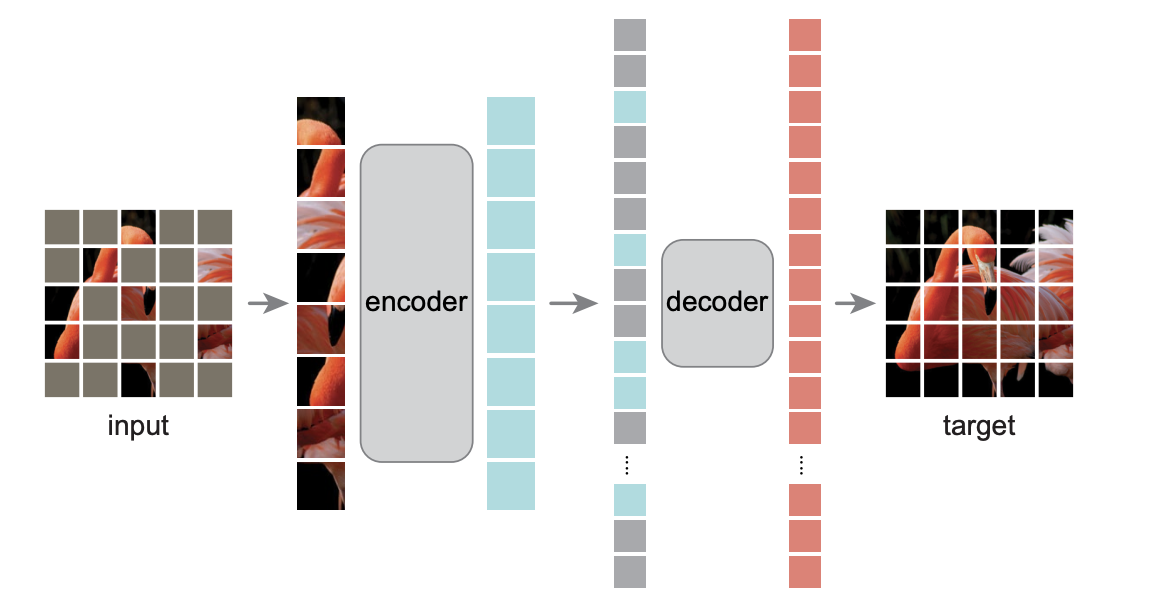
1、非对称的encoder-decoder架构编码器只作用在可见的patch中,对于丢掉的patch,编码器不会对它进行编码,这样能够节省一定的计算时间。解码器是一个比较轻量的解码器,拿到编码器的输出之后,重构被遮挡住的块。
2、使用较高的mask比例将mask比例设置为75%,迫使模型得到一个较好的自监督训练效果。如果只是遮住几块的话,只需要进行插值就可以出来了,模型可能学不到特别的东西。编码器只编码1/4大小的图片,可以降低计算量,训练加速3倍或者以上模型结构。最终作者只使用一个最简单的ViT-Huge模型(模型结构来自ViT这篇文章),在ImageNet-1K(100万张图片)上预训练,准确率能达到87.8%;这个模型主要是用来做迁移学习,它证明了在迁移学习的其他任务上表现也非常好注:在ViT这篇文章的最后一段有提到过怎样做自监督学习,作者说效果并不是很好,结论是:用有标号的模型和大的训练集可以得到很好的效果。本文亮点是,只使用小的数据集(ImageNet-1k,100万张图片),而且是通过自监督,就能够做到跟之前可能效果一样好的模型了。

网络结构

网络图